
Vehicle demo
-
proof
- Posts: 18
- Joined: Tue Mar 01, 2011 11:00 pm
Re: Vehicle demo
Well, GTA4 is probably using joints and even at high speeds the cars are stable and the handling is amazing because the cars can actually drift
-
mi076
- Posts: 144
- Joined: Fri Aug 01, 2008 6:36 am
- Location: Bonn, Germany
-
proof
- Posts: 18
- Joined: Tue Mar 01, 2011 11:00 pm
Re: Vehicle demo
I don't know how would we be able to simulate car sliding, because if you lower the friction then the car has troubles accelerating and steering (because of the lack of grip). On the other hand, increasing the friction makes the car go well but there isn't any drifting 
-
proof
- Posts: 18
- Joined: Tue Mar 01, 2011 11:00 pm
Re: Vehicle demo
I was trying to use btGeneric6DofSpringConstraint to attach wheels to the chassis but it doesn't seem to work (the wheels just go their separate ways). No idea on how to configure them 
-
mi076
- Posts: 144
- Joined: Fri Aug 01, 2008 6:36 am
- Location: Bonn, Germany
-
mi076
- Posts: 144
- Joined: Fri Aug 01, 2008 6:36 am
- Location: Bonn, Germany
-
proof
- Posts: 18
- Joined: Tue Mar 01, 2011 11:00 pm
Re: Vehicle demo
Nice catch 
I was thinking of actually setting up friction real-time by the amount of default_friction * dot(normalize(chassis_direction), normalize(chassis_velocity)), it might work.
I was thinking of actually setting up friction real-time by the amount of default_friction * dot(normalize(chassis_direction), normalize(chassis_velocity)), it might work.
-
mi076
- Posts: 144
- Joined: Fri Aug 01, 2008 6:36 am
- Location: Bonn, Germany
Re: Vehicle demo
i think provided raycast class can be taken as starting point for own class, for example you can use raycasting code and suspension code and rewrite impulse calculation for movement completely... so you will have all control, may be i shall try it little later... i found one old example (s. code in attachment) :Nice catch
I was thinking of actually setting up friction real-time by the amount of default_friction * dot(normalize(chassis_direction), normalize(chassis_velocity)), it might work.
http://www.asawicki.info/Mirror/Car%20P ... Games.html
you can check the results with your own car
:http://www.youtube.com/watch?v=trJocyjCBzo
http://www.youtube.com/watch?v=iX5ZZd_CMzs
You do not have the required permissions to view the files attached to this post.
Last edited by mi076 on Sat Jul 16, 2011 11:22 pm, edited 1 time in total.
-
dumbo2007
- Posts: 66
- Joined: Sun Jan 30, 2011 8:46 pm
Re: Vehicle demo
ok this isnt exactly a physics issue but it concerns the rendering of the vehicle produced using btRaycastVehicle so maybe I can get some help here.
I am trying to render the car using OpenGL. The car has a chassis and 4 wheels. The chassis is simply a cuboid and the wheels are cylinders. I have their positions from Bullet as OpenGL matrices. If I pass these matrices to glMultMatrixf() in turn and push and pop matrices correctly then I do get the car rendered correctly as it moves around.
Now I am trying something different. I am trying to render one of the wheels without using glMultMatrixf(). So given the transformation matrix I am trying to simply translate the wheel into position(not bothered about orienting it at the moment). The code marked as //----debug code----- in the bottom shows this part.
So what I have is the wheel transformation matrices in the matrices m1, m2, m3, m4. I chose one of the wheels(forward left wheel) whose matrix is in m2 and tried to use the translation elements of the matrix to translate the wheel into position. But it does not work as expected and there is a difference in the mesh positions between the wheel rendered through glMultMatrixf() and that rendered through glTranslatef(). I used the following to understand the opengl matrix format :
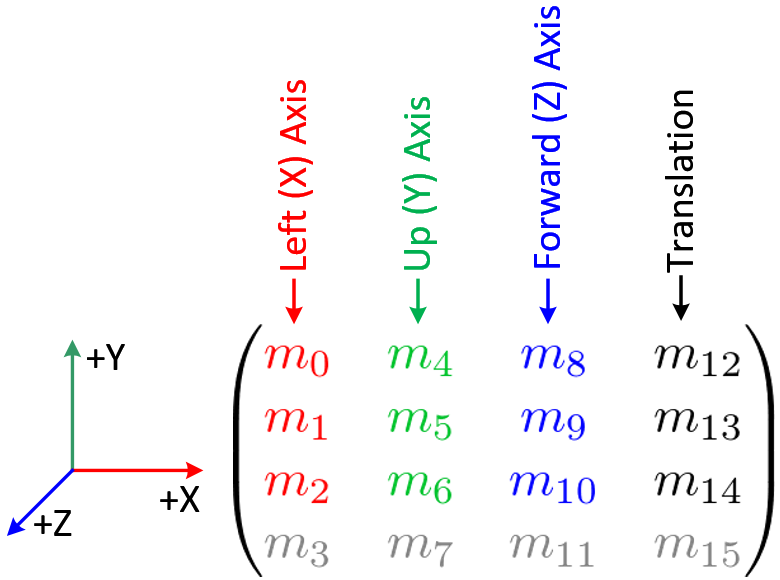
The reason I subtract ptrShapes->m[...] from the respective x,y,z positions is because I have already translated to the position given by it using glMultMatrixf(). The postion given by m is the global position of the vehicle. Here is a video of the thing :
http://www.youtube.com/watch?v=0iATE7MVTkE
Also if I dont subtract m and directly render the wheel using m2 then I get the desired effect. Here is the code
Video :
http://www.youtube.com/watch?v=E0hyQjclx58
Now I cannot understand why the 2 don't match. If I have already translated to the proper vehicle position using m then if I render the wheel at the translated position with respect to the vehicle(by subtracting the translation elements of m from the translation elements of m2) I should get the same position. Obviously the rotations around the axes do not make a difference here as then I would not have got the right position by rendering at m2 directly.
I need to render the wheels using their positions with respect to the main vehicle(whose co-ordinates are in m) due to some restrictions in the API of the Orbiter Space flight simulation software in which I am trying to integrate the vehicle.
Long story short...I can only render the wheel with respect to the vehicle(whose world space coordinates are in m). So I need to get the correct co-ordinates fo the wheel with respect to the vehicle after I have been given the world space co-ordinates of both the wheel(in m2) and the vehicle(in m)
I am trying to render the car using OpenGL. The car has a chassis and 4 wheels. The chassis is simply a cuboid and the wheels are cylinders. I have their positions from Bullet as OpenGL matrices. If I pass these matrices to glMultMatrixf() in turn and push and pop matrices correctly then I do get the car rendered correctly as it moves around.
Code: Select all
//Render Ground Plane-------------------------------
	float PLANE_EXTENT = 100.0f;
	glBegin(GL_QUADS);
		glTexCoord2f(0.0f, 1.0f); glVertex3f(-PLANE_EXTENT,  0.0f, -PLANE_EXTENT);	// Top Left Of The Texture and Quad
		glTexCoord2f(0.0f, 0.0f); glVertex3f(-PLANE_EXTENT,  0.0f,  PLANE_EXTENT);	// Bottom Left Of The Texture and Quad
		glTexCoord2f(1.0f, 0.0f); glVertex3f( PLANE_EXTENT,  0.0f,  PLANE_EXTENT);	// Bottom Right Of The Texture and Quad
		glTexCoord2f(1.0f, 1.0f); glVertex3f( PLANE_EXTENT,  0.0f, -PLANE_EXTENT);	// Top Right Of The Texture and Quad
	glEnd();

    glColor3f(1.0,0,0);
	//Render Chassis-----------------------------------
	glPushMatrix();
	glMultMatrixf(ptrShapes->m);
	glMultMatrixf(ptrShapes->childMat);
	drawBox(ptrShapes->halfExtent[0], ptrShapes->halfExtent[1], ptrShapes->halfExtent[2]);
	glPopMatrix();

//Render the obstructing green box
	glColor3f(0.0,1.0,0.0);
	glPushMatrix();
	glMultMatrixf(ptrShapes->m_box);
	drawBox(ptrShapes->box_halfExtent[0], ptrShapes->box_halfExtent[1], ptrShapes->box_halfExtent[2]);
	printf("\n box : %f, %f,%f", ptrShapes->box_halfExtent[0], ptrShapes->box_halfExtent[1], ptrShapes->box_halfExtent[2]);
	glPopMatrix();


//Render the 4 wheels
glColor3f(1.0,1.0,0);

	for (int i=0; i<4; i++){
		glPushMatrix();
		switch(i){
			case 0 : glMultMatrixf(ptrShapes->m1);break;
			case 1 : glMultMatrixf(ptrShapes->m2);break;
			case 2 : glMultMatrixf(ptrShapes->m3);break;
			case 3 : glMultMatrixf(ptrShapes->m4);break;
		}

		drawCylinder(ptrShapes->radius, ptrShapes->halfHeight, ptrShapes->upAxis);
		printf("\n r : %f  ht:%f", ptrShapes->radius, ptrShapes->halfHeight);
		glPopMatrix();
	}


//---------------Debug code : for pink wheel-----------------------
	glColor3f(1.0,0.0,1.0);
	glPushMatrix();
	glMultMatrixf(ptrShapes->m);
	glTranslatef(ptrShapes->m2[12] - ptrShapes->m[12],
				 ptrShapes->m2[13] - ptrShapes->m[13],
				 ptrShapes->m2[14] - ptrShapes->m[14]);
	drawCylinder(ptrShapes->radius, ptrShapes->halfHeight, ptrShapes->upAxis);
	glPopMatrix();
So what I have is the wheel transformation matrices in the matrices m1, m2, m3, m4. I chose one of the wheels(forward left wheel) whose matrix is in m2 and tried to use the translation elements of the matrix to translate the wheel into position. But it does not work as expected and there is a difference in the mesh positions between the wheel rendered through glMultMatrixf() and that rendered through glTranslatef(). I used the following to understand the opengl matrix format :
The reason I subtract ptrShapes->m[...] from the respective x,y,z positions is because I have already translated to the position given by it using glMultMatrixf(). The postion given by m is the global position of the vehicle. Here is a video of the thing :
http://www.youtube.com/watch?v=0iATE7MVTkE
Also if I dont subtract m and directly render the wheel using m2 then I get the desired effect. Here is the code
Code: Select all
	//---------Debug code------------
	glColor3f(1.0,0.0,1.0);
	glPushMatrix();
	glTranslatef(ptrShapes->m2[12] ,
				 ptrShapes->m2[13],
				 ptrShapes->m2[14] );
	drawCylinder(ptrShapes->radius, ptrShapes->halfHeight, ptrShapes->upAxis);
	glPopMatrix();
http://www.youtube.com/watch?v=E0hyQjclx58
Now I cannot understand why the 2 don't match. If I have already translated to the proper vehicle position using m then if I render the wheel at the translated position with respect to the vehicle(by subtracting the translation elements of m from the translation elements of m2) I should get the same position. Obviously the rotations around the axes do not make a difference here as then I would not have got the right position by rendering at m2 directly.
I need to render the wheels using their positions with respect to the main vehicle(whose co-ordinates are in m) due to some restrictions in the API of the Orbiter Space flight simulation software in which I am trying to integrate the vehicle.
Long story short...I can only render the wheel with respect to the vehicle(whose world space coordinates are in m). So I need to get the correct co-ordinates fo the wheel with respect to the vehicle after I have been given the world space co-ordinates of both the wheel(in m2) and the vehicle(in m)
-
mi076
- Posts: 144
- Joined: Fri Aug 01, 2008 6:36 am
- Location: Bonn, Germany
Re: Vehicle demo
@shadiq
Thank you.
Here is an interesting tutorial (1930 !!) how differential works
http://www.youtube.com/watch?v=K4JhruinbWc
(you can fast forward to 1:50)
Thank you.
Here is an interesting tutorial (1930 !!) how differential works
http://www.youtube.com/watch?v=K4JhruinbWc
(you can fast forward to 1:50)
-
mi076
- Posts: 144
- Joined: Fri Aug 01, 2008 6:36 am
- Location: Bonn, Germany
-
proof
- Posts: 18
- Joined: Tue Mar 01, 2011 11:00 pm
Re: Vehicle demo
Looks great 
Amazed by the new looks, however I still hate the throttle
Amazed by the new looks, however I still hate the throttle
-
mi076
- Posts: 144
- Joined: Fri Aug 01, 2008 6:36 am
- Location: Bonn, Germany
Re: Vehicle demo
Thank you for looking at it... The engine implementation is very early, i have moved to custom raycast class for a while.
Last edited by mi076 on Thu Jul 14, 2011 10:22 pm, edited 1 time in total.
-
John1789
- Posts: 15
- Joined: Fri Sep 02, 2011 11:54 am
Re: Vehicle demo
cool... how do i get the souce code of this demo?